
Can't sign in
If you are having difficulties signing into the Hub, the cause is usually:
- You first need to sign into Microsoft's services via a browser
- Your version of Outlook needs updating
Signing into Microsoft's service first
Microsoft's authentication services may first need to be invoked via a browser, so visit http://www.outlook.com/ and sign in. This will kick their services into life and you should then be able to sign into the CloudFiler Hub.
Updating Outlook if you are running Classic Outlook
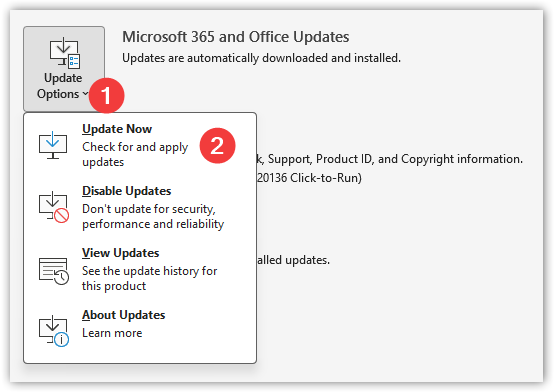
Users running Classic Outlook can update it as follows:
- Pick File from the Outlook pull-down menu, then pick Office Account from the foot of the sidebar menu
- Then pick Update Options and Update Now
Updating Outlook if you are running New Outlook
In most cases, New Outlook updates automatically and re-starting Windows will ensure you have the latest version, but your IT may have a 'policy' that is limiting you to an earlier release, so you may need to seek their help.