
Emails don't open
When you either double-click an email or hit the Open button at the foot of the preview, the email should open in Outlook. This can fail for one of four reasons:
- You don't have our Helper application running
- Your browser is blocking the download
- Your anti-virus is preventing our Helper from running
- Your browser is not downloading files to the downloads folder
You don't have our Helper application running
Whether you are using the CloudFiler Hub or have installed our separate Helper App, you should find it running - check in Windows Task Manager:
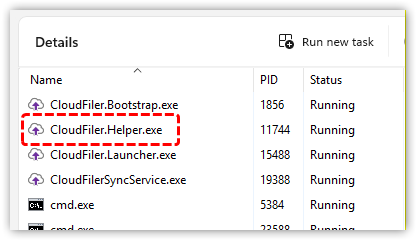
If it's not running, you need to either install the Hub or our Helper App.
Your browser is blocking the download
You can change your browser settings to allow email file formats to download without interruption: Stop the browser asking me whether to keep emails
Your anti-virus is preventing our Helper from running
You may need to let your antivirus know which CloudFiler Apps to whitelist. Details are here: Anti-malware exclusion paths
Your browser is not downloading files to the downloads folder
By default, browsers will download to the downloads folder, but this is something you may have changed. The Helper watches the downloads folder and is triggered when emails arrive in that folder. If you have changed the folder, the Helper won't notice them and won't open them for you.