
Hub sync
NOTE: this is a new feature which is in Beta testing. We will inform customers when it is ready for all to use. This documentation is provided to give you advanced awareness of what it will provide.
The Hub sync enables one or more of your Hub instances to sync emails to their destinations.
Once we have enabled it on your tenant and initially for a selected user, that user's machine will handle all the syncing.
Impact on user devices
You may be concerned about the impact on individual user machines but it's tiny.
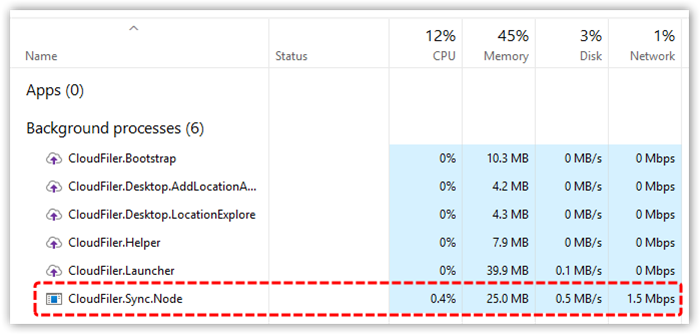
This screen shot of Task Manager was taken when testing a huge data sync with just the one machine handling the whole load. As you can see the impact on: CPU, memory, disk and network are all small.
How is it different to the SERVICE and NODE sync Apps?
The Hub Sync has a number of key advantages over the SERVICE and NODE sync connectors which have the following limitations:
- They can only run on one machine
- The user account under which they run needs to have write access to everywhere
- To sync to SharePoint, they must route the files via OneDrive
The Hub sync addresses these and other issues because it:
- Can be run on multiple PCs
- Needs no installation, set-up or configuration as the Hub is already authenticated via Microsoft 365 – we just make a change on our servers to enable it for you
- Syncs to all types of storage
- Shares the load across all machines, which both increases performance and removes the single point of failure
- Works fine with Autodesk Forma that only supports up to 80 projects per user, because each user’s machine can write to its own projects
- Supports all four pathing syntaxes you may encounter with SharePoint and writes directly to it rather than syncing via OneDrive
Syncing to SharePoint
If you plan to file into SharePoint please take a look at: Adding SharePoint locations